
Beyond Use Cases with Storyboarding
 The use case is now widely known as a technique to capture functional requirements. As long as we focus on core requirements in the early phase of software development, it works very well. However, once we have captured our business goals and want to see more details, especially user interface, we have to find other techniques and describe the detailed specifications in other documents separately. It makes our engineering process time-consuming when we get change requests. Also, use cases without UI information are not so easy for business users to understand. This article proposes a new approach for gathering requirements with storyboards. It’s an approach that visualizes the use cases and enables business to walk through conceptual screens so that they can easily understand the proposed system.
Problems
In the whole software development process, we repeatedly have discussions with business about their needs and constraints and so on, We define the functional requirements in use cases, which are used as starting points for other stakeholders. For example, UI designers can start screen designs, architect can start architectural design for implementations, and QA team can start creating a test plan based on the use cases.
However, we need to spend a lot more time to refine the use cases due to a lack of details. In general, use case techniques are used in capturing core requirements, so we should avoid refining too many use cases. Hundreds of use cases make it difficult to understand and maintain consistency. Having said that, what if we don’t describe the details? Developers and testers may choose easier ways that are not acceptable to business. Or they may simply ignore the cases; no implementation and no testing.
To avoid the problem, we normally describe the details in separate documents. But it also has some problems. One of the biggest problems is that the use case descriptions defined in the early phase are not updated. This is because our concerns have moved to details, which are not described in the use case document. As a result, even though we spend lots of time on them, no one, not even the business case users, sees the use cases. But the use cases are still important in and after the development, including in the maintenance phase, to clarify and remind what and why we implemented as we did.
In addition, we have one more problem: Business users often get more ideas when they
see prototypes or mock-up screens, and ask us to change the requirements.That is good for refining and making requirements better, but we have already started designing (and implementing testing sometimes), so it can definitely have a big impact. We need to find another approach that will allow us to easily manage such details in use cases, and also make it understandable to business.
Solution
Business users often ask me how the screen looks, even in the early phase, to understand the system we propose. So, I explain by drawing some simple wireframes on white board. Some elements and text messages are enough to express the system’s behavior. This sort of visualization lets them get on the same page, and you can get more feedback from them.
Similar effects can be seen in a storyboard technique that visualizes interactions between system and user. The storyboard was originally developed in the film industry in which a series of pictures that represent each cut scene are organized in sequence. It pre-visualizes the script so that team members can easily understand what they have to do. The technique can also be applied to solving this problem. Here, I introduce a free storyboard tool, ezStory (http://www5f.biglobe.ne.jp/~webtest/ezstory/), developed with JavaScript. It allows you to draw a conceptual screen on a HTML page and define some actions that the system and/or user make take place as shown in Figure 1.
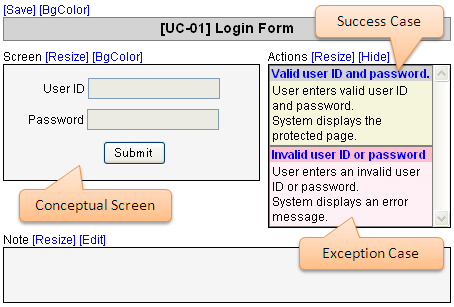
Figure 1. Conceptual Screen and Actions defined on ezStory
The screens can be linked to each other based on your requirements, and business can go through the pages just like they were accessing the final developed system.
There is one more important feature in the ezStory, which generates a storyboard document from the screens with use case description style. As you can see in figure 2, it looks like an ordinary use case description, but you can also see the conceptual screens defined in the HTMLs, which help readers understand where each action takes place and where it navigates if it’s performed.
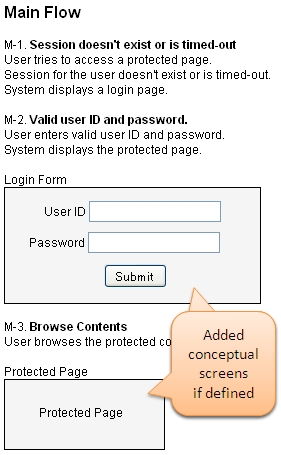
Figure 2. Conceptual Screen in Generated Use Case Description
In Figure 1, we defined two actions, a success case and an exception case (invalid ID or password). So, the ezStory generates a Main Flow and an Exception Flow in the document. If you add one more success case to the action list, an Alternative Flow will appear after the Main Flow. Since the screens and document are generated as HTML files, you can simply email or publish on web server so that business can also access the storyboard on their PCs.
Conclusion
Use case techniques have some problems that require us to describe and manage detail specifications and UI information separately, and maintenance of the documents can be difficult. In order to go beyond the constraints, I recommend using the storyboard tool, ezStory, which helps us visualize use cases and add more details in the use case descriptions. However, I don’t recommend skipping the creation of use cases in your process. We should focus on core requirements first to find what business users want, then start storyboarding to refine the use cases. If you start storyboarding from the beginning, your business may be confused due to too much information, unless your application is small.
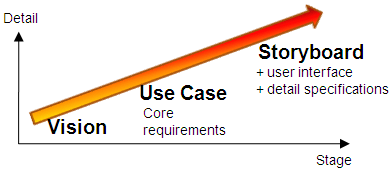
Figure 3. Vision, Use Case and Storyboard
I hope I have encouraged you to storyboard in your requirements gathering, and that it helps you capture all requirements in a use case document and in the entire development process.
Resources: ezStory homepage: http://www5f.biglobe.ne.jp/~webtest/ezstory/
Don’t forget to leave your comments below
Masayuki Otoshi develops Web applications for a manufacturing company as a senior developer, and a developer of ezStory. He can be reached at [email protected].