
Nearly Painless UML
UML (Uniform Modeling Language) is a significant technical advance in the ability to formally specify, visualize and document existing and envisioned improvements to business processes and systems. UML was established by the collaborative efforts of three software engineering leaders each of whom had his own formalized methodology: Grady Booch, James Rumbaugh, and Ivar Jacobson.
They were able to create a common set of formalized concepts, diagramming conventions and methods to foster clear and efficient communications that are effective for both traditional and the modern needs for object-oriented programs, database systems, and web-based applications. UML has since evolved into an industry standard for software engineering best practices that is supported by tools such as Microsoft Visio and others.
While UML concepts have had much potential for improved communication of existing processes and business requirements with business management and staff, their potential is often difficult to realize in implementation.
Conventional wisdom suggests a multi-day UML class to train the key business users in UML similar to that done successfully for technical staffs. However, motivating and training already busy executives, business management and staff in a “cram UML course” often is overwhelming and ineffective plus it can easily instill a pervasive negative attitude toward UML and the requirements definition processes due to its perceived complexity and actual rigor.
The “Painless” UML Alternative
Business Analysts that have attained a good understanding and command of UML can identify current business processes and issues as well as communicate a vision for business improvements using UML. By using some extra imagination and ingenuity they can create effective diagrams, charts, ROI analysis and functional specifications to communicate meaningful business concepts in UML that can be easily understood by business management, functional-area staff and technical staff without mentioning UML.
These specifications and presentations can often be based on UML concepts, diagrams and methods without subjecting the business community to the rigors and “Pain” of formal UML training. The primary goal of the Business Analyst and their Business Clients is to establish effective communication – the particulars of what type of arrow is used in which diagram is only important when all are trained to use the same exact conventions or when communicating with UML-Trained and practicing technical staff.
In many organizations, UML is often not of interest and not a priority for executives, managers and non-technical staffs – nor must it be. In the author’s experience, effective UML and non-UML diagrams can be used to communicate efficiently to subtly begin introducing advanced UML concepts such as object-oriented inheritance, use-cases, functional swim-lanes and business process flows as ways to better understand and communicate business concepts. In this way, such advanced concepts are efficiently introduced and learned gradually in a more natural way, as discussed below.
In many cases the innovative Business Analyst can consolidate a big picture of how the business is supposed to work, actually works or should work better into a single picture that is “worth a thousand words” to clarify, communicate and help make the right business and/or technical decisions (as illustrated in the example below).
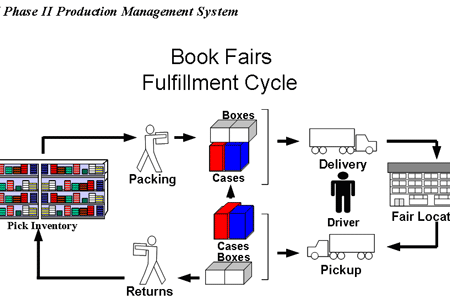
The concepts communicated in high-level diagrams, such as shown above, can be further decomposed into functional components and detailed specifications that are easily 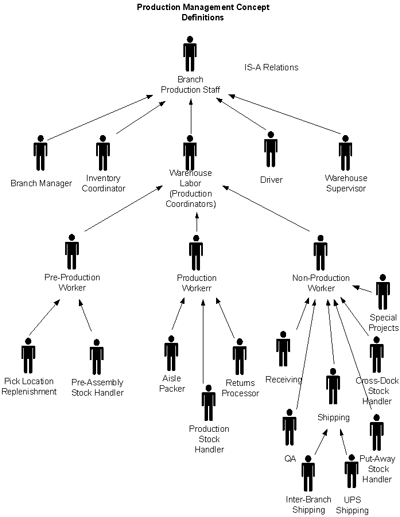 understood by technical and non-technical staff alike. Because staff members are already familiar with their business, they can now better see the complete picture and readily grasp new and advanced concepts such as inheritance (IS-A Relations) in the diagrams.
The staffing for the warehouse is clearly depicted in the object-oriented UML inheritance diagram (on the right) that shows the different roles assumed by warehouse workers.
Likewise, the same approach can be applied to define other types of objects such as products or equipment to clearly specify the general types and subtypes.
The functional vision for a proposed system can be introduced at a high level (as shown below) and then subsequently shown in more detail as the functional design approach is further detailed.
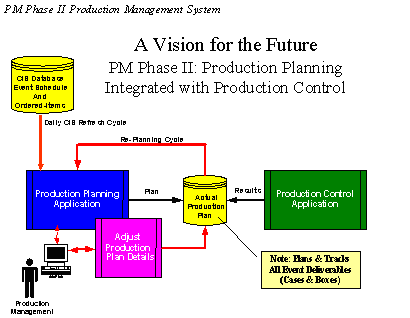
The functional design for a system as it affects different departments and functional organizations as well as the primary input and output information sources are shown in the example below,
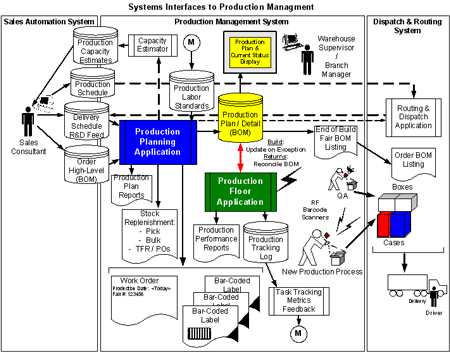
The three separate vertical areas are called “Swimlanes” in UML. The diagram above clearly shows the functionality and high-level process flow among: Sales Automation, Production Management and Dispatch & Routing whether you know UML or not.
As business processes are defined at additional levels of detail, “Use Cases” are a very effective way to identify business objects and the business operations that must be supported in the application for those objects as shown in the example below.
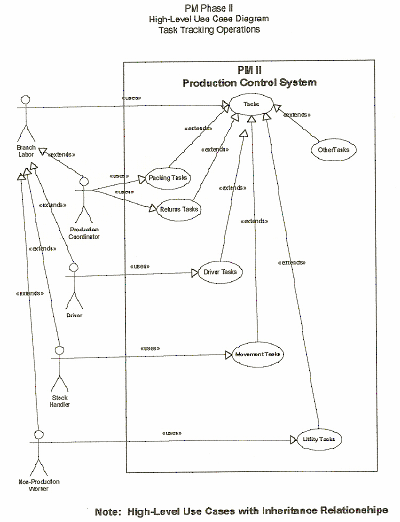
Use Case diagrams provide additional detail by showing which operations may be performed by each type of worker that was defined in the prior inheritance diagram.
Use Case diagrams also employ inheritance relationships that are easy to understand by both technical and non-technical staff.
The clarity provided by these diagrams and methods allow functional users to catch omissions and mistakes such as: allowing the packing and shipping tasks, but forgetting that you must also provide tasks to accept and process returns as a part of project reviews and discussions.
Use Case diagrams are especially important to object-oriented software development projects since they typically become a guide as to how the objects and programs are designed and structured.
As the business analyst continues to understand the new manual and automated processes that will be integrated, a new functional organization for the many different warehouses begins to emerge as a diagram that aids in efficient discussion, review and innovation by the functional, technical and management staff involved (as shown in the diagram below).
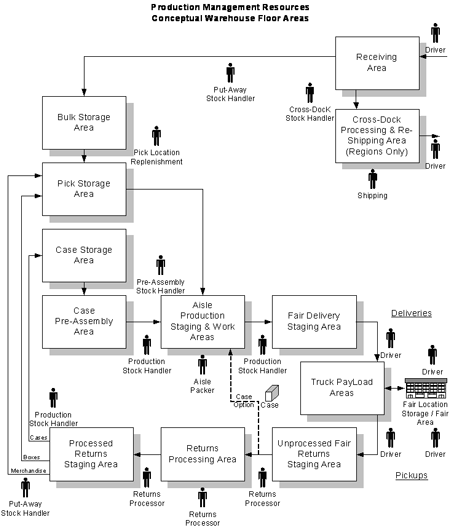
These examples are just a few ways a business analyst’s skill at understanding and creating effective pictures of your current process and the vision for your improved manual and automated business processes can be evolved methodically as a progressive series of steps.
Clear and effective communication of business facts and needs serves to get both technical and non-technical staff on the same page as well as leads to better project results.
In Summary
This “Painless UML” case study has supplied examples as to how UML and even sophisticated concepts can be gradually introduced and discussed with business staff in a natural way by presenting their own business requirements and processes in a understandable format and making the extra effort to ensure that staff comprehends it.
The full UML (Unified Modeling Language) is quite extensive and many of its features, diagrams and nuances are primarily of concern to the technical staff – “Under the Hood”, so to speak, in the mechanic’s and engineer’s world. Similarly, you only need to understand a car’s controls to drive it just as only a portion of the UML is needed for effective Business Analyst to Business Staff communication in the requirements definition and review processes.
The Business Analyst is the key to effective application of “Nearly Painless UML” for excellence in specifications for the technical community plus keeping the business community focus on effectiveness in the communication, review and gathering of business requirements information without mention of UML.
Byron Claghorn is Director of Corporate Development for Point North Consulting. In this role he is able to leverage his broad experience to both develop and support the various Point North Consulting practices and our service offerings. He has had a long and varied computer science, engineering R&D and consulting career with Burroughs and Unisys Corporation, Vice President of Engineering and Manufacturing for Microcard Technologies and as an Air Force data-automation officer. Much of his career has been focused upon the development of software products and application development tools, client-specific integration of document imaging technology with existing computerized applications, databases and host systems. Byron can be reached at [email protected] or 407-514-2651
นวดเชียงราย
… [Trackback]
[…] Read More Information here to that Topic: batimes.com/articles/nearly-painless-uml/ […]